DNS Record Types Explained
1. What DNS is (very simple)
DNS = Domain Name System.
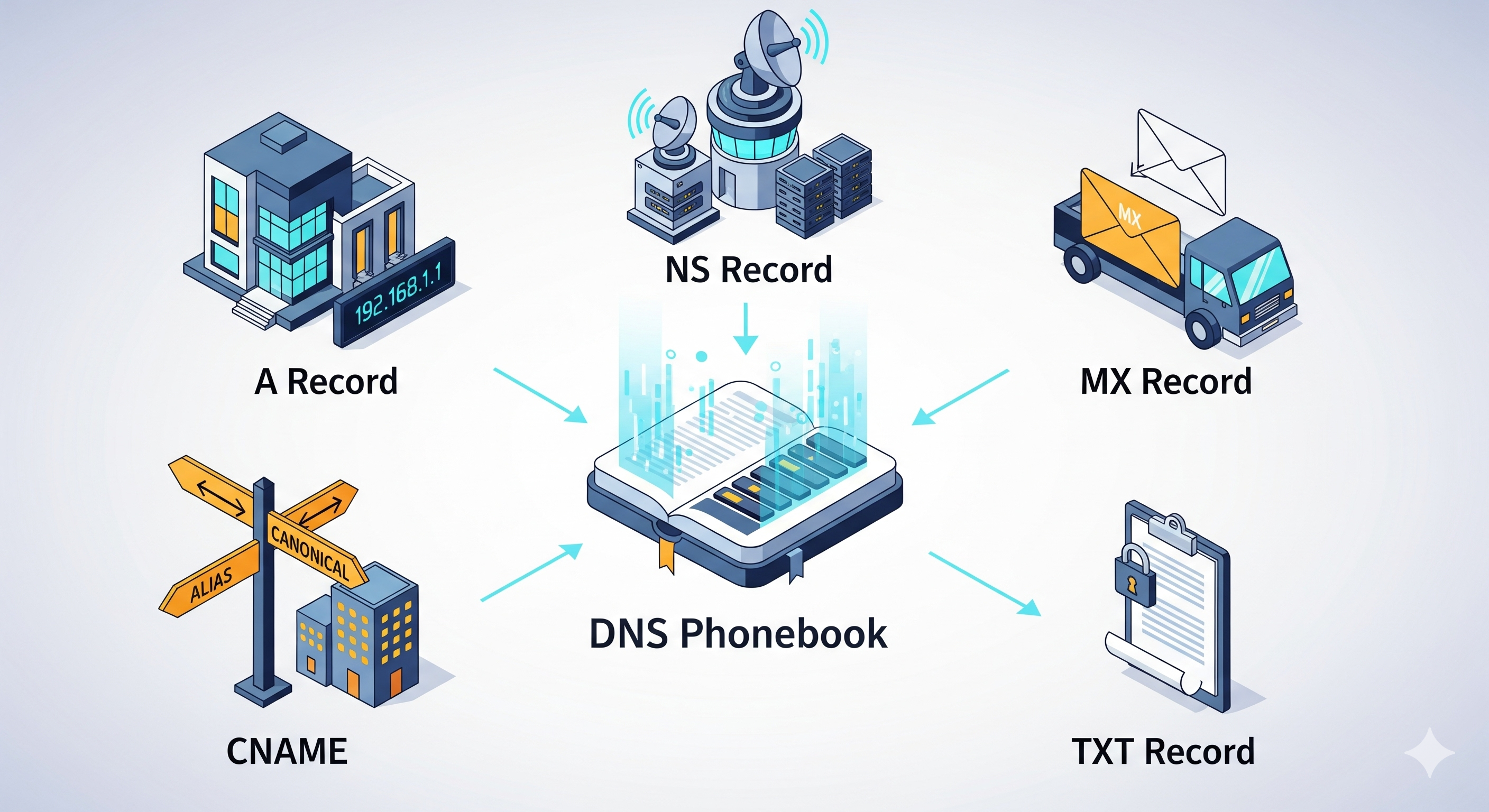
It is like a phonebook for the internet.
You remember names like
google.com, but computers need number addresses like142.250.183.206(an IP address).DNS changes a domain name (like a contact name) into an IP address (like a house address).
Example:
You type example.com in your browser → browser asks DNS → DNS replies with a number address → browser goes to that server.
2. Why DNS records are needed
DNS is not just one big answer.
It has many small pieces of information called records.
Each record type answers a different question.
Example questions:
“Which server shows the website?”
“Which server gets emails?”
“Who manages this domain’s DNS?”
“Is this email really from this domain?”
These answers are stored as DNS records under your domain, like different entries under one contact in your phone.
3. NS record – who is responsible
NS Record = Name Server record.
It tells: “These servers are responsible for DNS of this domain.”
They are like the office where the main phonebook for your domain lives.
When the internet wants any DNS info for
yourdomain.com, it first finds the NS records to know which DNS server to ask.
Example:yourdomain.com → NS records say:
So the world knows: “Ask these name servers for all other records (A, MX, etc.) of this domain.”
Common confusion:
NS is about “who holds and answers the DNS records.”
MX is about “who receives emails.” (More on MX later.)
4. A record – domain → IPv4 address
A Record (Address record) connects a domain name to an IPv4 address (a normal-looking IP like 192.168.1.10).
Question it answers: “Where is the website server (IPv4)?”
It is like saying: “The house of
example.comis at street number93.184.216.34.”
Example:example.com → A record → 93.184.216.34
So when someone visits example.com, the browser goes to that IPv4 address.
Common confusion (A vs CNAME):
A = points to a number address (IP).
CNAME = points to another name, not directly to an IP.
5. AAAA record – domain → IPv6 address
AAAA Record connects a domain name to an IPv6 address (a newer, longer IP like 2001:0db8::1).
Question it answers: “Where is the website server (IPv6)?”
It is like a second type of house address, but for IPv6.
You can have both A and AAAA records for the same domain, so it works on both IPv4 and IPv6 networks.
Example:example.com → AAAA record → 2001:db8::1234
6. CNAME record – one name to another name
CNAME Record (Canonical Name) points one domain name to another domain name, not to an IP.
Question it answers: “If someone asks for this name, which other name should they use?”
It is like a contact in your phone: “Call ‘My Work Site’ → actually call ‘maincompany.com’.”
The final IP will come from the A/AAAA record of the target name.
Example:
www.example.com→ CNAME →example.comexample.comhas an A record →93.184.216.34
So the flow is:
www.example.com → (CNAME) → example.com → (A) → 93.184.216.34
Common confusion (A vs CNAME):
Use A when you want to point directly to an IP address.
Use CNAME when you want this name to follow another name (and use its IPs).
7. MX record – how email finds your mail server
MX Record (Mail eXchanger) tells which server handles email for a domain.
Question it answers: “Where should emails for this domain be delivered?”
It is like telling the post office: “For letters to this domain, send them to this mail center.”
MX records usually point to a name, not a raw IP, and that name will have its own A/AAAA record.
Example:
For mycompany.com:
MX record:
priority 10mail.mycompany.comThen
mail.mycompany.com→ A record →203.0.113.5
When someone sends an email to hello@mycompany.com:
Email server checks MX for
mycompany.com.Finds
mail.mycompany.com.Looks up A/AAAA for
mail.mycompany.com.Sends the email to that IP address.
Common confusion (NS vs MX):
NS = “Who answers DNS questions for this domain?”
MX = “Who receives emails for this domain?”
8. TXT record – extra info and verification
TXT Record stores text information under your domain.
Question it answers: “What extra info does this domain want to share?”
Often used for:
Email security (SPF, DKIM, DMARC).
Domain ownership verification (Google, Microsoft, etc.).
Other small notes for machines to read.
Example uses:
SPF (which servers can send mail for your domain)
v=spf1 include:_spf.google.com~all
Verification:
google-site-verification=some-random-code
These look scary, but think of TXT as sticky notes attached to your domain for other services to read.
9. How all DNS records work together for one website
Imagine you have a small website: mycoolsite.com with a blog and email.
Here is how records might work together:
NS records
Say: “DNS for
mycoolsite.comis handled byns1.dnsprovider.comandns2.dnsprovider.com.”These are the main DNS managers.
A record
mycoolsite.com→203.0.113.10This is your main web server IPv4.
AAAA record (optional)
mycoolsite.com→2001:db8::10Same website, but via IPv6.
CNAME record
So
wwwalways follows the main domain’s IP.
MX record
And
mail.mycoolsite.comhas an A record to your mail server IP.This is how emails to
info@mycoolsite.comknow where to go.
TXT records
SPF record for sending safe emails.
Verification records for tools like Google Search Console.
High-level flow (simple story):
Browser: “I want
www.mycoolsite.com.”DNS:
Sees CNAME:
www.mycoolsite.com→mycoolsite.com.Looks at A/AAAA for
mycoolsite.com→ gets IP.
Browser goes to that IP and loads the website.
When someone sends mail to
hello@mycoolsite.com:Their mail server checks MX for
mycoolsite.com→ findsmail.mycoolsite.com.Then looks up A/AAAA for
mail.mycoolsite.com→ IP.Sends the email there.
10. Gentle recap in simple words
DNS is the phonebook of the internet.
NS: who keeps the phonebook for your domain.
A: name → IPv4 address (house number).
AAAA: name → IPv6 address (newer house number style).
CNAME: name → another name (like a nickname).
MX: where emails should be delivered.
TXT: extra notes for security and verification.